

The 4-Line Prompt
Set the stage, then ask. Four starter phrases turn a vague request into an answer you can actually use. Works in ChatGPT, Claude, and Grok.
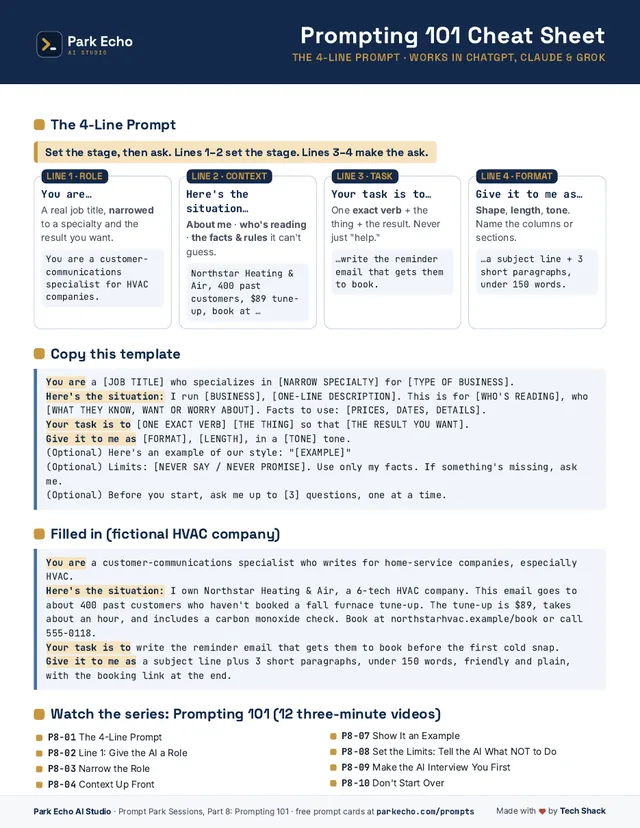
Lines 1–2 set the stage. Lines 3–4 make the ask.
There is no acronym to memorize. The four starter phrases are the formula. Say them in order and fill in your own details.
- Line 1 · Role
You are…
A real job title, narrowed to a specialty and the result you want.
Example: You are a customer-communications specialist for HVAC companies.
- Line 2 · Context
Here’s the situation…
About you, who’s reading, and the facts and rules it can’t guess.
Example: Northstar Heating & Air, 400 past customers, $89 tune-up, book at…
- Line 3 · Task
Your task is to…
One exact verb, the thing, and the result. Never just “help.”
Example: …write the reminder email that gets them to book.
- Line 4 · Format
Give it to me as…
Shape, length, and tone. Name the columns or sections.
Example: …a subject line and 3 short paragraphs, under 150 words.
Fill in the [brackets]
You are a [JOB TITLE] who specializes in [NARROW SPECIALTY] for [TYPE OF BUSINESS].
Here's the situation: I run [BUSINESS], [ONE-LINE DESCRIPTION]. This is for [WHO'S READING], who [WHAT THEY KNOW, WANT OR WORRY ABOUT]. Facts to use: [PRICES, DATES, DETAILS].
Your task is to [ONE EXACT VERB] [THE THING] so that [THE RESULT YOU WANT].
Give it to me as [FORMAT], [LENGTH], in a [TONE] tone.
Optional add-ons when the job needs them: paste an example of your style, set limits (“use only my facts; if something’s missing, ask me”), or say “before you start, ask me up to 3 questions, one at a time.” All three are on the cheat sheet, and each has its own lesson below.
What it looks like
You are a customer-communications specialist who writes for home-service companies, especially HVAC.
Here's the situation: I own Northstar Heating & Air, a 6-tech HVAC company. This email goes to about 400 past customers who haven't booked a fall furnace tune-up. The tune-up is $89, takes about an hour, and includes a carbon monoxide check. Book at northstarhvac.example/book or call 555-0118.
Your task is to write the reminder email that gets them to book before the first cold snap.
Give it to me as a subject line plus 3 short paragraphs, under 150 words, friendly and plain, with the booking link at the end.
Before you hit Enter: 4 yeses
- Is there a role?
- Is there a situation, with facts?
- Is there one exact verb, not “help”?
- Is there a format?
Before you use the answer
- Every price, date, name, phone number, and link matches your notes.
- No promise, discount, or claim you didn’t make.
- It sounds like your business. Read it out loud.
- You never pasted customer names, card or bank numbers, passwords, or health information.
12 short lessons, one idea each
Each lesson has a fill-in template and copy-and-paste prompts for a fictional small business, so you can see the idea in use and swap in your own details. Short videos for each lesson are coming later.
- 1. The 4-line prompt (fill-in formula)
The core formula in under three minutes: You are… / Here's the situation… / Your task is… / Give it to me as…, shown on an HVAC tune-up reminder email. - 2. Give the AI a role
Why 'You are…' works: a role sets the vocabulary, priorities and what to leave out, shown on a restaurant's food-allergy reply. - 3. Narrow the role to a specialist
The role ladder: broad role → industry → specialty + outcome, shown on a salon's rebooking text. - 4. Put the context up front
Line 2, 'Here's the situation': the three buckets of context (you, the reader, the rules), shown on an electrician's quote follow-up. - 5. Pick the right task verb
Line 3, 'Your task is…': swap vague verbs like 'help' for exact ones, shown on a bookkeeper's client-call notes. - 6. Ask for the format you want
Line 4, 'Give it to me as…': the format menu (shape, length, tone, reading level), shown on a real estate agent's listing comparison table. - 7. Show the AI an example of your writing
Few-shot prompting: paste 1–3 things you wrote and say what to copy (voice, length, structure) and what not to (the facts), shown on a boutique's product descriptions. - 8. Set the limits: what the AI must not do
Constraints: length caps, never-say lists, 'only my facts', and 'if something's missing, ask', shown on a plumber's running-late text. - 9. Make the AI ask you questions first
Add 'Before you start, ask me up to 5 questions, one at a time' so the AI collects the facts instead of guessing, shown on a landscaper's spring-plan flyer. - 10. Fix a so-so answer with follow-ups
Iterate in the same chat: change one thing at a time, say what to keep and what to fix, shown on a cleaning company's Facebook post. - 11. Prompt makeovers: three before-and-afters
Three quick before-and-after prompt rebuilds (auto shop review reply, diner specials post, gift shop holiday hours) plus a 4-question 'spot the weak prompt' check. Pure slides; no AI answers shown. - 12. Your fill-in-the-blank prompt template
The whole series in one reusable template: the 4 lines plus 3 optional add-ons (example, limits, ask me first), where to save it, and a filled-in pet-groomer demo.
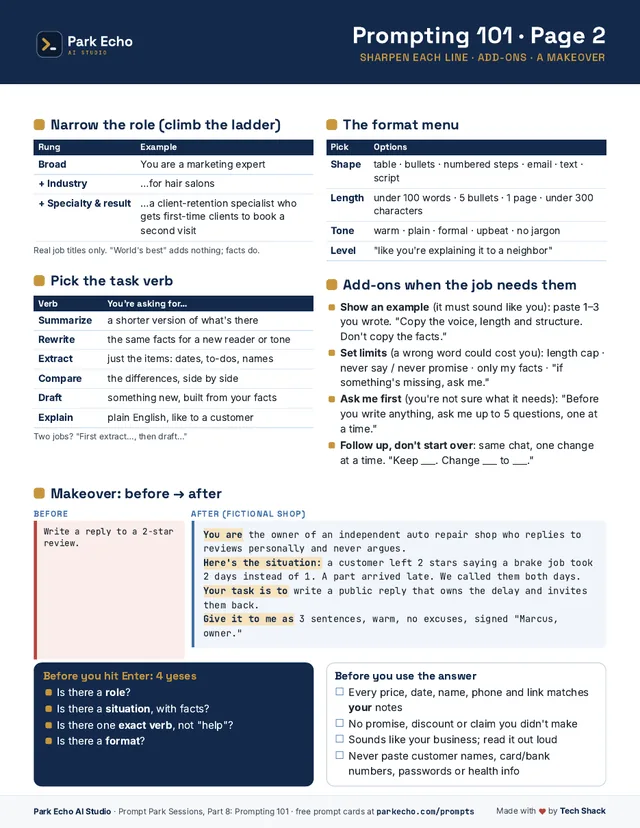
Keep it next to your keyboard.
Page 1: the four lines, the copy-and-paste template, and a filled-in example. Page 2: the role ladder, the task-verb list, the format menu, the add-ons, a before-and-after makeover, and both checklists.